• Government of Mauritius website allows weak security


    govmu.org

    A few days ago, Sruti mentioned on the Mauritius Internet Users mailing list that she had problems resetting her password on the Mauritius Government website.

    Out of curiosity, I decided to check if the login works correctly. While working on this, I made an interesting observation: The connection offered on the website is weak, in terms of security !

    By observing the SSL connection on my smartphone I came across a weak encryption offered by m.govmu.org, which is mobile version of the government of Mauritius website. Stunned by this discovery, I also check the PC-version of the government website and noticed that It also offers the same weak encryption.

    SSL handshake has read 2749 bytes and written 362 bytes

    New, TLSv1/SSLv3, Cipher is RC4-MD5

    SSL-Session:
    Protocol : TLSv1
    Cipher : RC4-MD5

    The govmu.org website allows RC4-MD5 which is considered to be weak encryption, according to RFC7464 . The document, which is now a standard on the Internet, recommends removal of RC4 as an encryption mechanism, due to practical attacks demonstrated against it.

    Implications for Mauritian Citizens

    It is possible to intercept and decrypt sensitive Information that a user sends to the Mauritius Government website, as it is. It is possible to set-up a practical attack, under certain circumstances. This is more dangerous, as more and more people are using wifi which magnifies the problem.


    –Logan

  • 23:59:60, the cyberisland and the leap second that we forgot


    The US is busy planning for the leap second transition


    Please see my previous blog post if you are not familiar with the leap second issue.


    The US has a document for “Best Practices” (URL: http://www.gps.gov/news/2015/05/leap-second/2015-best-practices-for-leap-second.pdf) which has been published by the Department of Homeland Security. I’m going to quote a few sections from it: Sponsored by the National Cybersecurity and Communications Integration Center in coordination with the United States Naval Observatory, National Institute of Standards and Technology, the USCG Navigation Center, and the Nation al Coordination Office for Space – Based Positioni ng, Navigation and Timing . This product is intended to assist federal, state, local, and private sector organizations with preparations for the 30 – June 2 015 Leap Second event.

    Below the introduction part of the document are a list of well detailed steps to prepare for the transition for the leap second that will occure on the 30th of June.

    Meanwhile in Mauritius

    I immediately went to look for the same information for Mauritius. My first choice is the Mauritius Standards Bureau. Looking at the relevant pages show nothing about Time (url: http://msb.intnet.mu/).

    My 2nd choice is thus CERT-MU, which is the Mauritian equivalent of CyberSecurity, expecting to find a document for “Best Practices” for the Leap Second. Result of the search on CERT-MU website : Zero.

    At this I start wondering what could be impacted by leap second in Mauritius. Websites crashes have been reported when previous leap seconds were added. Quote from a website: Sites such as Reddit, Gawker, LinkedIn, Foursquare and Yelp crashed after a “leap second” was added to the universal clock in order to keep up with the Earth’s rotation. So, A few critical websites might crash. This is important to everyday users.

    Other problems ?

    Wikipedia says that: Older versions of Motorola Oncore VP, UT, GT, and M12 GPS receivers had a software bug that would cause a single timestamp to be off by a day if no leap second was scheduled for 256 weeks. How many companies are relying on GPS for their operation: Car fleets, Car drivers, boats, and people with smartphones, and The Amadeus airline reservation system was disrupted for more than two hours which affects plane fights.

    Conclusion

    Important information such as leap second transition should have been available on CERT-MU website so that people and organizations can better prepare themselves, and avoid disruptive problems across the Mauritian Infrastructure.

  • Havoc on the 30th of june

    Big news: The earth is not rotating uniformly !

    Planet earth does not rotate uniformly. They are some subtle changes that affect its rotation. Those subtle changes affect the reference clocks that are used to keep time accurate on your computer, your smartphone, and the servers at Google, Yahoo!,Facebook, and instagram. If you think that time is not important, Have a look at your facebook posts, and see the time-stamp attached to each facebook post. Time is used everywhere on the internet 🙂

    A Leap second

    To account for those subtle changes in rotation, a leap second was introduced. A second is introduced each time those subtle changes occur. However, that insertion can cause issues on systems such as GPS. Some systems might not be able to handle the additional second, and crash and/or overload. The next leap second will occur on the 30th of June at midnight.

    Keep your time in sync

    The solution consists of using an NTP client on your servers, and correctly sync with a reliable Time Source, such as pool.ntp.org. So, please make sure that your servers are properly configured with NTP 🙂


    –Logan

  • Top websites visited by Mauritius and the compromised cyberisland


    Alexa top 10 Websites visited by Mauritians

    alexa

    Alexa is a web statistic tool which is very useful. The problem in Mauritius, is that we do not have much statistics. I was expecting facebook, yahoo, and youtube. One site (ask.com) immediately drew my attention and I knew that something was very wrong in Mauritius !


    Ask.com or how a lot of computers are compromised in the Cyberisland


    The ask toolbar is generally found on computers that have been compromised, and installed surreptitiously. At the 10th place, we have ask.com, which is a malware that infects a lot of browsers. I saw it on a few laptops of my co-workers, and friends. However, I never imagined that it was so widespread in Mauritius! Widespread enough that it’s the 10th most visited website by the island ! ask.com is typically accessed via browser toolbar that generates bad search results, and is notorious to remove completely.

    Ask toolbar slows down the computers on which it is installed. It is very difficult to remove completely. The computers that have ask toolbar installed are very likely to contain other malware. Those computers tend to slow down entire corporate networks due to excessive traffic. Microsoft rates it as high, in terms of security severity: Microsoft Advisory. I went to check with CERT-MU which is the in its own terms “… Mauritian Computer Emergency Response Team (CERT-MU), a division of the National Computer Board (NCB), Mauritius, to educate and enhance the awareness of the general public on the technological and social issues facing internet users, particularly on the dangers of getting online.” and found nothing concerning ask toolbar.


  • Using Linux or BSD as your slave for repetitive editing

    Generating URI on blogsum

    Blogsum is a minimalist & secure CMS which I use. The only problem so far is generating the blog post URL. Generally, it’s a long string of text such as Using Linux or BSD as your slave . However, I cannot use this as a URL generator. One way would be to use javascript or any decent client-side language to do that. What output would I expect ? Something like “Using-Linux-or-BSD-as-your-slave” . That’s a pain to generate manually: I have to copy-paste it, and replace every space with a ‘-“. However there is another way if you’re using Linux or BSD.

    The power of sed

    Some people tend to jump on fully fledged programming languages like Perl, or Python. To me, it’s like using a car to travel 5 meters down the road. The same group of people would probably use google to look up thousand of ways to do the editing. There’s a way to do it on a single line of fairly readable code, using sed. Sed is a tiny piece of software available under all BSD and Linux systems. It stands for “Stream Editor”. Sed can be used to do a lot of complex tasks.

    sed has an easy to remember usage pattern for those kind of tasks that you can type on your terminal:

    echo "Using Linux or BSD as your slave for repetitive editing" | sed 's/ /-/g'

    The output is: Using-Linux-or-BSD-as-your-slave-for-repetitive-editing

    Analysing the command we just typed

    echo just prints whatever you want. echo “XXX”, would print XXX on a terminal. By using echo “XXX XXX” and adding a ‘|’ we take the “XXX”, and send it for further processing. In this case, we send it to sed.

    sed takes the input “XXX XXX”, and applies an operation. In this case the, s means substitute. Now, what do we want to substitute ? We want to substitute the space character, with “-“. we use the / and then the ” ” to tell that to sed. Now, what character do we want to use ? the “-“. We use ‘/’, and then ‘-‘, and another / to terminate the expression. What does the ‘g’ stand for ? By default it will replace only the first occurence of space with “-“. We need to do it for all instances of space. so we use g for “global” replacement. That’s it: we’re done. Linux or BSD just did the grunt work for you 🙂


    (Please don’t hesitate to leave your comments :))
    –Logan

  • Using Linux or BSD as your slave for repetitive editing

    Generating URI on blogsum

    Blogsum is a minimalist & secure CMS which I use. The only problem so far is generating the blog post URL. Generally, it’s a long string of text such as Using Linux or BSD as your slave . However, I cannot use this as a URL generator. One way would be to use javascript or any decent client-side language to do that. What output would I expect ? Something like “Using-Linux-or-BSD-as-your-slave” . That’s a pain to generate manually: I have to copy-paste it, and replace every space with a ‘-“. However there is another way if you’re using Linux or BSD.

    The power of sed

    Some people tend to jump on fully fledged programming languages like Perl, or Python. To me, it’s like using a car to travel 5 meters down the road. The same group of people would probably use google to look up thousand of ways to do the editing. There’s a way to do it on a single line of fairly readable code, using sed. Sed is a tiny piece of software available under all BSD and Linux systems. It stands for “Stream Editor”. Sed can be used to do a lot of complex tasks.

    sed has an easy to remember usage pattern for those kind of tasks that you can type on your terminal:

    echo "Using Linux or BSD as your slave for repetitive editing" | sed 's/ /-/g'

    The output is: Using-Linux-or-BSD-as-your-slave-for-repetitive-editing

    Analysing the command we just typed

    echo just prints whatever you want. echo “XXX”, would print XXX on a terminal. By using echo “XXX XXX” and adding a ‘|’ we take the “XXX”, and send it for further processing. In this case, we send it to sed.

    sed takes the input “XXX XXX”, and applies an operation. In this case the, s means substitute. Now, what do we want to substitute ? We want to substitute the space character, with “-“. we use the / and then the ” ” to tell that to sed. Now, what character do we want to use ? the “-“. We use ‘/’, and then ‘-‘, and another / to terminate the expression. What does the ‘g’ stand for ? By default it will replace only the first occurence of space with “-“. We need to do it for all instances of space. so we use g for “global” replacement. That’s it: we’re done. Linux or BSD just did the grunt work for you 🙂


    (Please don’t hesitate to leave your comments :))
    –Logan

  • Karbonn Sparkle V & Android One

    Android One

    Android One is a label that targets emerging markets. It specifies the minimum hardware requirements that a smartphone must have to be supported for 2 years by Google. This is one of the major opportunities for us in Mauritius. Some of you may think that it’s too good to be true, but it exists, as I got myself an Android One phone !

    Karbonn Sparkle V

    I bought an android-one certified phone from an Indian Manufacturer Karbonn. Mine is the Karbonn Sparkle V. When I got it, It was still on Android 4.4. As soon as I configured the wifi, It offered the possibility to be updated to Android 5.0 . Many high end phones are still shipping with Android 4.4 today without any updates to Android 5.0. sparkle


    • Display size: 4.5 inches
    • CPU: Quad-core 1.3 GHz Cortex-A7
    • Internal memory : 2GB
    • GPU: Mali-400MP2
    • RAM: 1GB
    • Camera (back): 5 MP, 2592 х 1944 pixels, autofocus, LED flash
    • Camera (front): 2MP
    • GSM: 2G, 3G, 4G


    User experience

    Yesterday night, I updated to Android 5.1.1. UX-wise, the phone is very responsive, and snappy. My only complaint would be the lack of internal storage space. I think that 4GB would have been better. Another version of the Sparkle is currently brewing. I hope that Google bumps the hardware specs for the next Android One label. The price is very competitive: Rs 5700-5900 depending on where you buy it. Overall, I’m very happy with my purchase, and I definitely plan to buy another Android One phone at the end of this year.


    Android One firmware

    firmware

    It is worth pointing out that Google offers 2 years of firmware update support. This is fantastic, as I get the equivalent of a Google Nexus phone, at a much more reasonable price. This is the major win for the Android One phones. Unlike manufacturers that tend to ignore firmware updates after 6 month, Google makes a smart move here.


    –Logan

  • Improving NTP security against overflows

    Saving the world … on time !

    ntp_intro

    The Network time protocol is a standard which is used to keep our computer’s time accurate. The science involved in keeping clocks ticking on computers is far more complex than most people would assume.

    As a comparison: The number of lines of code for University of Delaware NTP implementation — which is the most widely deployed NTP software — is slightly less than the source code of Internet Software Consortium’s BIND product. I will spare us the details of the hair-pulling mathematics involved 🙂

    Security record of Delaware NTP

    I do not want to criticise the work of the past NTP developers. I am merely looking at the list of past vulnerabilities:

    • Buffer overflow in crypto_recv()
    • Buffer overflow in ctl_putdata()
    • Buffer overflow in configure()

    So what is a buffer overflow ? Let’s use a picture to illustrate this:

    buffer_overflow

    As we can see here: The attacker keeps putting more sugar in the pan until it literally overflows. In computers, you can do the same thing. You can put more input than the storage location can accept, and you essentially overflow its content to the next adjcent storage location. There’s one difference however: if you are smart, you can use the overflowing “sugar” to take control of the remote computer ! This is one of the classic ways to crack into a remote computer such as an NTP server, a Mac OS X laptop, or even a windows laptop. For geeks, you can put some “magic” in the overflowing sugar that executes “/bin/bash” and you can then run whatever you want on the NTP service.

    Defeating overflows

    I have extended the NTP memory allocator — a manager which is in charge of allocating storage space in live memory — and added an additional function that checks for buffer overflows that occur under certain conditions, namely multiplication. As I said previously, a lot of NTP involves complex mathematical calculations that can lead to vulnerabilities. This defeats an entire class of buffer overflows in NTP. Due to the large number of products that use University of Delaware NTP software, this is a significant step towards improving the Internet Security at large !

    To put it in more simpler terms: We prevent the attacker from overflowing the pan with sugar. We have detectors in place that signal to the chef that something went wrong in the kitchen.

    List of products using University of Delaware NTP software

    I have attempted to list a few well known products which use University of Delaware NTP software. This is by no means, exhaustive:

    • Various CISCO products.
    • RedHat/CentOS Linux.
    • Ubuntu Linux.
    • Apple Macbooks.
    • And many others


    –Logan

  • Android One camera issue

    Android One camera freeze

    wedding

    While attending a wedding today, I wanted to use my camera to record videos. When I switched to video mode, The application froze. Android reported that it was not able to connect to the camera.

    Dark Powers of Linux to the rescue

    Since Android was running a Linux kernel, I knew from experience that this was very likely a device driver module. Of course, since I did not have full access to the android kernel message log, I knew that it was based on my instinct 🙂

    I still wanted to record the speeches about the responsibilities of Marriage from the gentleman who took his time to lecture the newly wed couple. So, I knew that I had to find a way to reset the camera. My idea was since I had switched to video mode before it froze, it probably remained in that state. I quickly killed the application, and reloaded it . Unsurpringly, it started directly in recording mode. I just had to click on record, and it did the trick.

    My theory is that switching back and forth from camera to photo mode causes the driver to hang up with the Android kernel. Since my phone is supported by Google, I sent a report to them on the phone itself, including how to reproduce it 🙂

    Google Android One rocks

    Thanks to the support from Google, I can send bug reports to them, as the phone is supported for 2 years. Unlike other phone manufacturers, it’s much better in my humble opinion.


    –Logan

  • Upgrade to Xubuntu 15.04 – Vivid Vervet

    Upgrade to Xubuntu 15.04 - Vivid Vervet

    Running an operating system like Ubuntu or any of its derivates, like ie. Xubuntu, comes with some nice treats (and threats?). One of the nice things is that you’ll get a scheduled upgrade approximately every six months. Usually, around April and October of each year. Meaning there are two releases per year resulting in those version numbers [Year].04 and [Year].10. Also, ever two years the April edition of Ubuntu is classified as a Long-Term Support (LTS) version which keeps an extended period of time. A nice touch and surely interesting for professional installations of Ubuntu but eventually not too practical for the daily use at home or when you’re interested in latest versions.

    Preparing the system

    These steps are the same every time you decide to upgrade to the latest release. Eventually, you might be interested to update older installation and have a read here: 

    In general, you should have a look at the official upgrade documentation of Ubuntu. Next, get your recent system up-to-date before you consider to upgrade. Also, take care that there are no pending partial upgrades or packages on hold. This might have a negative impact on the installation process of the newer packages. So, before you think about upgrading you have to ensure that your current system is running on the latest packages. This can be done easily via a terminal like so:

    $ sudo apt-get update && sudo apt-get -y dist-upgrade --fix-missing
    Upgrade to Xubuntu 15.04 - Vivid Vervet

    Next, we are going to initiate the upgrade itself:

    $ sudo update-manager

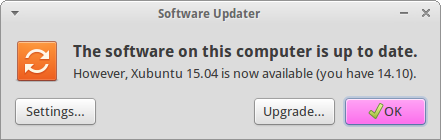
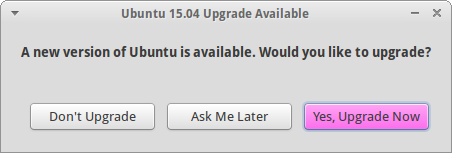
    As a result the graphical Software Updater should inform you that a newer version of Ubuntu is available for installation.
    Upgrade to Xubuntu 15.04 - Vivid Vervet

    Ubuntu’s Software Updater informs you whether an upgrade is available

    Running the upgrade

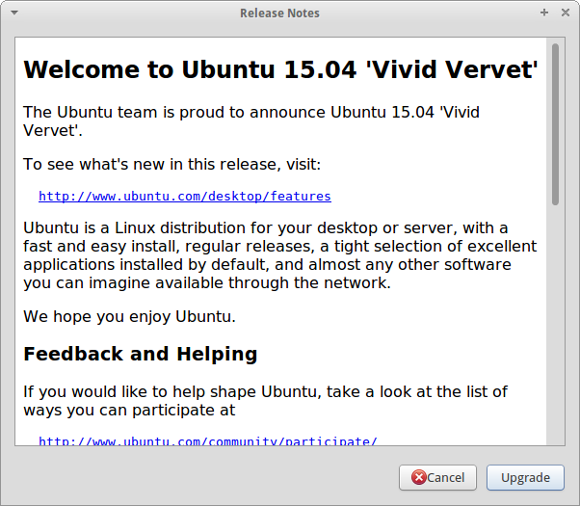
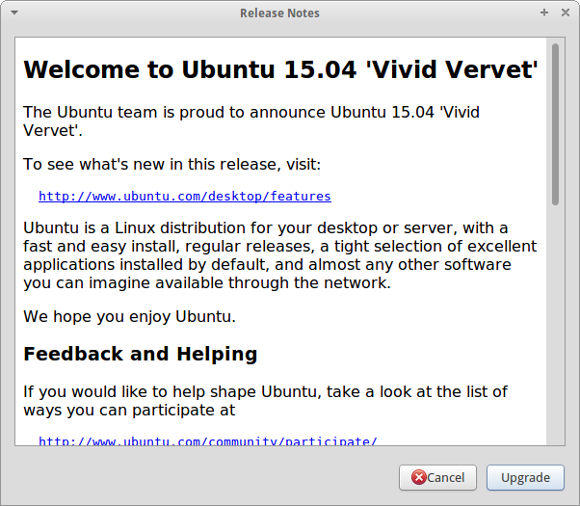
    After clicking ‘Upgrade…’ or ‘Yes, Upgrade Now’ you will be presented with information about the new version.
    Upgrade to Xubuntu 15.04 - Vivid Vervet

    Details about Ubuntu 15.04 (Vivid Vervet)

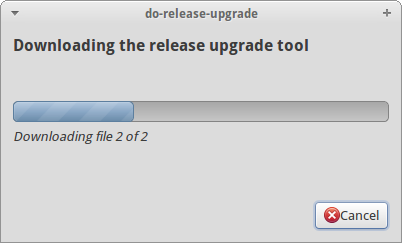
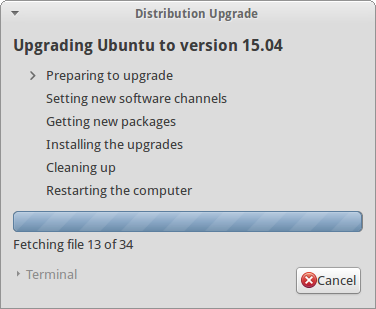
    Simply continue with the procedure and your system will be analysed for the next steps.
    Upgrade to Xubuntu 15.04 - Vivid Vervet

    Analysing the existing system and preparing the actual upgrade to 15.04
    Upgrade to Xubuntu 15.04 - Vivid Vervet

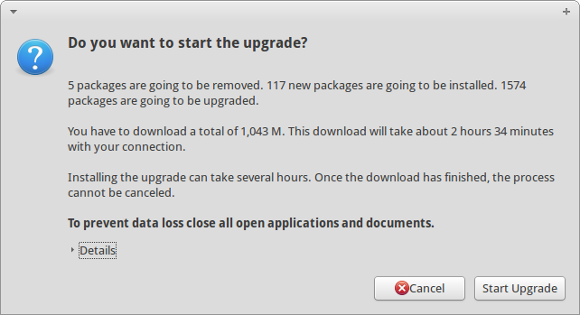
    Next, we are at the point of no return. Last confirmation dialog before having a coffee break while your machine is occupied to download the necessary packages. Not the best bandwidth at hand after all… yours might be faster.
    Upgrade to Xubuntu 15.04 - Vivid Vervet

    Are you really sure that you want to start the upgrade? Let’s go and have fun!

    Anyway, bye bye Unique Unicorn and Welcome Vivid Vervet!

    In case that you added any additional repositories like Medibuntu or PPAs you will be informed that they are going to be disabled during the upgrade and they might require some manual intervention after completion.
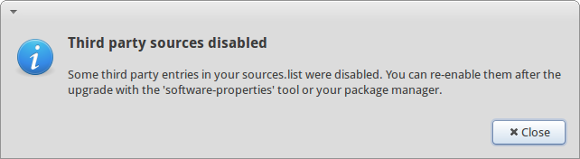
    Upgrade to Xubuntu 15.04 - Vivid Vervet

    Ubuntu is playing safe and third party repositories are disabled during the upgrade

    Well, depending on your internet bandwidth this might take something between a couple of minutes and some hours to download all the packages and then trigger the actual installation process. In my case I left my PC unattended during the night.
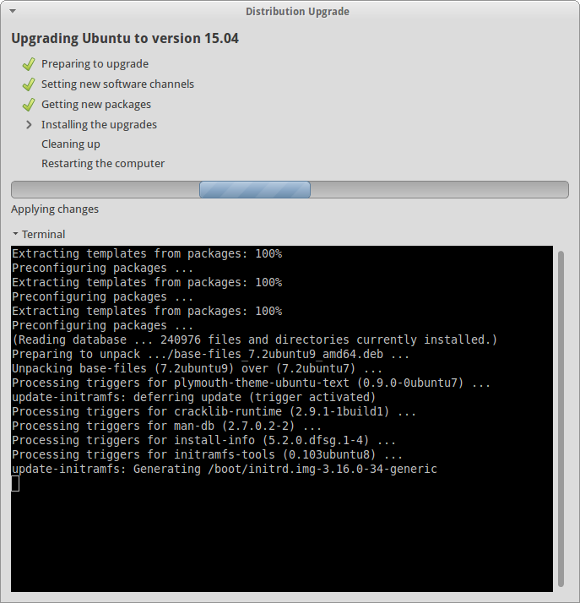
    Upgrade to Xubuntu 15.04 - Vivid Vervet

    At the end Xubuntu will ask you whether you would like to remove old and obsolete packages of the previous version.
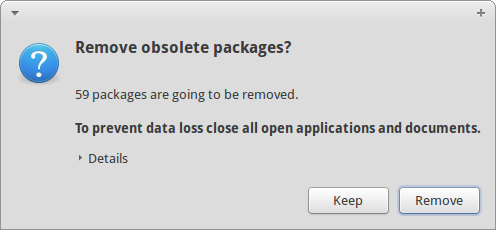
    Upgrade to Xubuntu 15.04 - Vivid Vervet

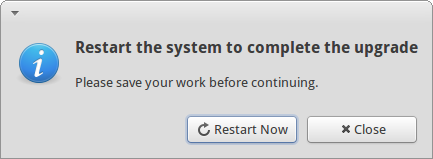
    Time to reboot

    Upgrade to Xubuntu 15.04 - Vivid Vervet

    Finally, it’s time to restart your system and see what’s going to happen… In my case absolutely nothing unexpected. The system booted the new kernel 3.19.0 as usual and I was greeted by a new login screen.

    Honestly, ‘same’ system as before – which is good and I love that fact of consistency – and I can continue to work productively. And also Software Updater confirms that we just had a painless upgrade:
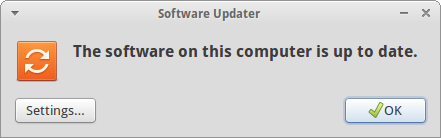
    Upgrade to Xubuntu 15.04 - Vivid Vervet

    System is running Ubuntu 15.04 – Vivid Vervet – and up to date

    See you in six months again… 😉

    Post-scriptum

    In case that you would to upgrade to the latest development version of Ubuntu, run the following command in a console:

    $ sudo update-manager -d

    And repeat all steps as described above.