As soon as FreeBSD8.0rc1 came out (some hours after being uploaded) i wanted to try it out on my new work laptop (HP DV6 1160ei), surprised and sad i was to find that the installer itself couldn’t proceed further…i got bumped with this error:
lots of stuffs after the bootloader….
:
:
:
uhub7: 8 ports with 8 removable, self powered
ugen7.2: at usbus7
ugen4.2: at usbus4
ugen5.2: at usbus5
run_interrupt_driven_hooks: still waiting after 60 seconds for xpt_config
run_interrupt_driven_hooks: still waiting after 120 seconds for xpt_config
run_interrupt_driven_hooks: still waiting after 180 seconds for xpt_config
run_interrupt_driven_hooks: still waiting after 240 seconds for xpt_config
run_interrupt_driven_hooks: still waiting after 300 seconds for xpt_config
stalls here and freezes forever. Which means your installation cannot proceed further.
Seems the problem is related to the firewire support, this problem has been here since FreeBSD7.2,
it seems to affect mostly gigabyte and asus mainboards (others plz do comfirm??). Seems the systems tries to query for firewire storage devices and then is stucked at that point..
The easy fix to this is to just go into your BIOS and disable firewire device and install your FreeBSD leisurely….
but but but… poor me, i just got a damned new HP Pavillon DV6 sexy lookin laptop which doesn’t have any advanced BIOS settings to disable firewire .
I definitely couldn’t be vulgar and just open that up and take out the firewire port :p that would be gross… specially since the laptop isn’t my property.
So my my my, i had to find a way out of this, googling around, it seems there’s no fix for that, since most are lucky enough to have disable firewire in their bios itself,
unless i was crazy and maso to dare run winxp or win vista on my laptop [thoughts of which were so disturbing that i dared not use that laptop and was even thinking of returning it back.
since the install iso itself boots a freebsd kernel, i believed for a temporary solution i could disable firewire via device hints in that loader console,
unfortunately, it didn’t seem to work…. so i did what most people would have done since they have the source and the ability to do anything with it… i played with it :p
i found a solution :p remove firewire support in the iso :p.. all the ways i don’t use that, if ever am gonna use that later on, once i’ve got freeBSD installed, i can think of it later and get it to work later on :p.
So… till i find the bug and correct it in the source itself or till someone else does it, i’ve managed to get the installer to work…
here’s how:
Requirements:
- Download the dvd iso image of FreeBSD 8.0 Rc1.
- You need a FreeBSD8.0Rc1 installed somewhere [I installed one on a VM (since i didn’t wanna break existing installation)]
(ps. it can be a minimal installation, since you don’t need desktop or anything in this temporary setup, you just need it to recompile that kernel in the installation cd :p)
10 GB of space minimum
What to do?
- log in as root (who cares its a vm machine and you are going to break it all the ways)
- Extract the contents of the iso in a folder somewhere in a directory somewhere in your FreeBSD8.0rc1 [temporary installation] on the vm.
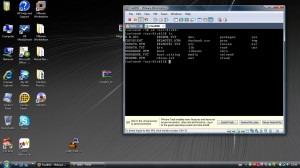
(since i had already burnt it on a dvd, i just copied the contents of the dvd in a folder called /usr/disk1)
- use sysintall to install the release source and the kernel sources. (configure>distributions>src> sys and release).
- configure your kernel so as you don’t include firewire devices:
- cd /usr/src/sys/i386/conf (change i386 to your architecture)
- cp GENERIC SELVENKERNEL
- nano SELVENKERNEL (or vi or ee or whatever editor you like) (comment out the firewire related modules [among the last lines)
- make buildkernel KERNCONF=SELVENKERNEL
- make installkernel KERNCONF=SELVENKERNEL
that’s it, you have already completed most of the work, go to your /usr/disk1 directory [where the dvd iso contents were copied earlier remove the kernel folder in its boot directory and replaced with your new kernel). do like this:
- rm -rf /usr/disk1/boot/kernel
- cp -R /boot/kernel /usr/disk1/boot/kernel
great we are almost done… (ps. if you want you can set splash images also :p)
anywayz, you should then use mkisoimages to build your new dvd iso….
- sh /usr/src/release/i386/mkisoimages.sh -b FreeBSD8 /isowork/myrelease.iso /usr/disk1
where -b FreeBSD8 can be anything you want, /isowork is just a directory i have made to keep the final iso, and /usr/disk1 is the contents which you want to have in your iso :p.
If ever it complains about some rr_moved error or something simmillar, please do delete the directory named rr_moved from your /usr/disk1 directory
- rm -rf /usr/disk1/rr_moved
so relaunch your mkisoimages if ever it failed with the rr_moved :p.
after its done… you shall have a nice iso in your destination directory /isowork :p (or your directory you chose)
- you can use cdrecord to burn the iso to a dvd :p
Though, being lazy, i just scp’ed it to my other computers, went to sleep, woke up in the morning and burnt it 🙂
:p I tried to launch the install from that DVD … now it works! yupeee, finally i’ll be able to use that laptop.
Hope this helped out those poor souls out their who wanted to have their Favourite OS on their HP Pavillon DV6 :p
EDIT: Additional stuffs, once installed your new system shall be unbootable, you should boot from the installation dvd, start a shell there, mount the partition and cp -R /mnt2/boot/kernel to your new /boot directory in your harddisk (after mounting it somewhere).
Also, if you are using gnome please add these in /etc/rc.conf
moused_enable=”YES”
hald_enable=”YES”
dbus_enable=”YES”
ps. actually i wanted to try out 8.0 rc1 in the hope that i might catch a bug and hoped to find a fix and hopefully contribute back to the community.. lol .. that one was unexpected!
pps. plz ignore gramatical errors, typed this in nano, and refrain from starting OS flamewars since its tiring to reply to those :p
ppps. To save you the trouble i can upload the iso image, lemme know.
pppps. Am not responsible if you blow up your computer or whatever :p. My sincere apologies in case of errors.
+selven
pcthegreat A_T gmail / [email protected]



 A ben voilà une nouvelle pour Geeker un peu avant de reprendre le travail Lundi matin. Deiban 6.0 vient de sortir, “Squeeze” avec quelques petits concepts innovants.
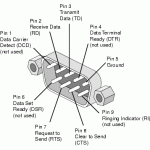 Et ben, voila j’ai perdu un écran sur la machine qui me sert de routeur. Sans clavier ni écran le diagnostique n’est pas facile en cas d’erreur. Mais heureusement le mode console est là. Je ne sais pas depuis combien de temps cela existe dans le kernel, mais je pense que cela ne doit pas être loin des origines.